
White-label reports
A branded PDF report for one site — overall score, the issues-found trend, what was fixed vs. new since the last report, 404s and broken links recovered, Search Console movers, and AI-bot activity — generated with one command and, optionally, e-mailed on a schedule. Built for agencies: put your logo, colour, and "prepared for {client}" on it and hand it to the client.
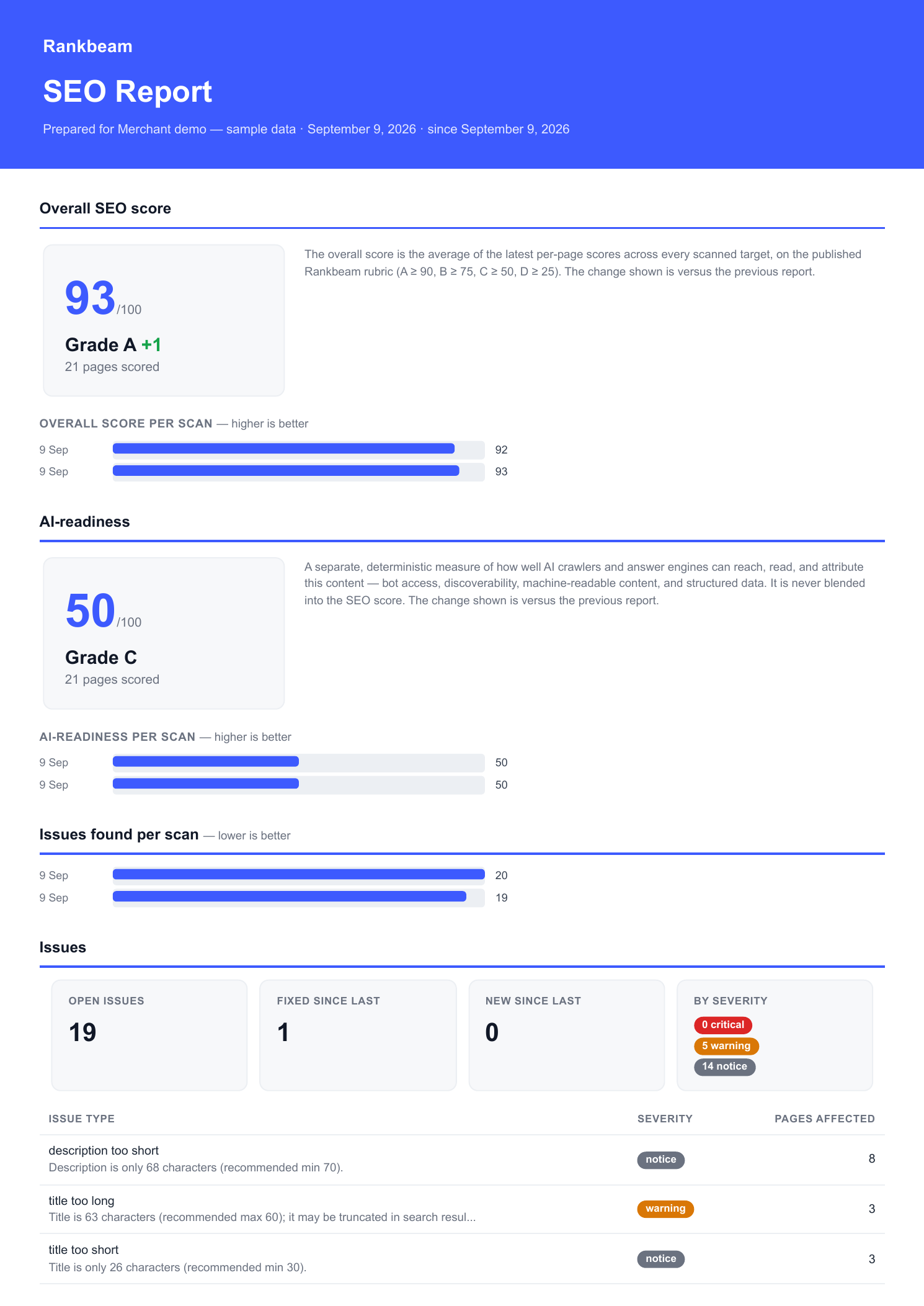
Download the sample report (PDF) or follow the scan → fix → report walkthrough. The sample uses seeded Merchant content and two fresh scans; it shows one fixed issue, 19 still open and no Search Console data.
This redesigned companion summarizes the recorded scan and report evidence. It is not the default Pro PDF layout.
What's in it
- Overall score — the average of the latest per-page scores (the published rubric: A ≥ 90 … F), with the change since your last report, plus an overall-score trend across your recent scans. Each scan now stamps the site's score onto the run, so the trend is real per-scan history — it starts filling in from the first scan after you upgrade (older runs carry no score and are simply skipped).
- Issues found per scan — a real trend over your recent completed scans (fewer is better).
- Issues fixed vs. new — how many defects you cleared and how many appeared since the last report. Read from the real issue history — issues now carry a fixed / reopened lifecycle — once a full period has run under it, and from the previous report's snapshot otherwise.
- Recovered — broken links resolved, 404s recovered (the path returns 200 again on its own — see
seo-pro:404-recheck) and 404s redirected since the last report, plus what's still open. A recovered 404 is a genuine source-side fix, counted separately from a redirect. - Search Console — top queries and pages, and movers: the biggest click swings versus the last report. Skipped cleanly when GSC isn't set up.
- AI-bot activity — requests attributed by user-agent (not verified bot identity), lifetime totals, and — from the day-granular bucket history when it covers the window — real hits this period and distinct URLs each bot crawled (falling back to the snapshot lifetime-diff otherwise).
"Since the last report"
The report is period-over-period against your previous report, not against an arbitrary date. Each time you generate one, a lightweight snapshot is stored (seo_report_runs) — the score, the open-issue identities, the Search Console rows, and each bot's hit counter. The next report diffs today's state against that snapshot.
This is the fallback for signals that keep no history of their own: per-page scores are kept latest-only. Snapshotting at report time turns those into an honest comparison. Several signals now keep real history and the report prefers it, using the snapshot only as a fallback: issues carry a fixed / reopened lifecycle (genuine fixed/new counts once a full period has run under it), Search Console keeps day-granular metrics, and AI-bot hits keep day-granular buckets (real per-period hits + distinct URLs). Each falls back to the snapshot diff for the first report after upgrading, or when the history doesn't cover the window.
Two consequences:
- The first report is a baseline. It shows current state; the "fixed", "new", movers, and "since last report" figures fill in from the second report onward.
- Cadence is up to you. Generate monthly and the deltas cover a month; generate weekly and they cover a week. Use
--no-storefor an ad-hoc preview that must not move the baseline.
Generate a report
php artisan seo-pro:reportWith no options it writes a PDF to storage/app/seo-reports/. Point it somewhere, or e-mail it:
# Write to a specific file or directory
php artisan seo-pro:report --output=/tmp/acme-october.pdf

# E-mail it to one or more recipients (the PDF is attached)
php artisan seo-pro:report --email=client@acme.com --email=pm@agency.com

# One-off preview that does NOT store a snapshot (deltas won't advance)
php artisan seo-pro:report --no-store --output=/tmp/preview.pdf

# Machine-readable summary
php artisan seo-pro:report --json
Options
| Option | Effect |
|---|---|
--client= | Override the "prepared for" client label |
--agency= | Override the agency name on the report |
--accent= | Override the accent colour (hex, e.g. #3D5AFE) |
--logo= | Override the logo image path |
--email= | Recipient address (repeatable); e-mails the report |
--send | E-mail to the configured recipients |
--output= | Write the PDF to this file or directory |
--no-store | Don't persist a snapshot (period deltas won't advance) |
--json | Emit a machine-readable summary |
Schedule the e-mail
The package never schedules itself — you own the cadence. In your app's console schedule (routes/console.php or app/Console/Kernel.php):
use Illuminate\Support\Facades\Schedule;

Schedule::command('seo-pro:report --send')->monthly();
Set the default recipients once, in config or .env:
SEO_PRO_REPORT_RECIPIENTS="client@acme.com,pm@agency.com"--send falls back to those; explicit --email options override them.
Branding
Branding is non-secret, so it lives in config — set it once and every report picks it up. Any field can be overridden per report with the command options above (handy when one install reports for several clients).
SEO_PRO_REPORT_AGENCY="Blue Whale Studio"
SEO_PRO_REPORT_LOGO="/var/www/brand/logo.png"
SEO_PRO_REPORT_ACCENT="#3D5AFE"
SEO_PRO_REPORT_CLIENT="Acme Outdoor Co."
SEO_PRO_REPORT_CONTACT="hello@bluewhale.studio · bluewhale.studio"
SEO_PRO_REPORT_FOOTER="Confidential — prepared for Acme Outdoor Co."
Notes:
- Logo — an absolute path to a
PNG/JPG/GIF/WEBP/SVGfile. It is embedded in the PDF as a data URI, after the application reads the file, so the renderer does not need to fetch that image over the network.PNGorJPGis safest. - Accent colour — validated to a hex literal; a bad value falls back to the default. It only ever appears as a colour, never as raw CSS.
- Agency name — defaults to your app's name (
config('app.name')).
The full config block lives under reports in config/seo-pro.php, including paper (default a4), include_gsc, and how many trend runs / GSC rows / bots to include.
One site per install
Pro scans the one application it is installed in, so a report describes that install. An agency running several client sites generates one report per install (the --client / branding overrides label each). There is no multi-tenant "sites" model.
How it's built
The PDF is rendered with dompdf by default — pure PHP, no Node or headless Chromium — so a scheduled report renders inside a queue worker or cron with zero system binaries, and Pro stays headless. Remote fetching is disabled in the renderer; the only image (your logo) is embedded, so nothing in a rendered field can trigger a fetch.
Reports in every script (Browsershot renderer)
From core 3.20 / Pro 2.40, the Chrome renderers disable JavaScript and block HTTP(S), FTP and WebSocket asset requests. Published templates must use static HTML/CSS with embedded assets. These controls concern page assets; Chrome still needs a correctly configured host and sandbox. The PDF renderer logs an actionable font-install warning when Fontconfig reports a missing script, including a minority script in mixed text. A missing font does not stop Chrome from producing a PDF, so inspect the output before sending a report.
dompdf draws only the font it embeds (DejaVu Sans: Latin, Cyrillic, Greek), so a report for a Japanese, Thai or Arabic client renders tofu. Since Pro 2.34 the report can be rendered by headless Chrome through spatie/browsershot instead — the same dependency the core uses for OG images, so one machine is configured once:
// config/seo-pro.php → 'reports'
'renderer' => 'browsershot',   // default 'dompdf'
'browsershot' => [
    'chrome_path' => null,      // null = reuse seo.og_image.chrome_path
    'node_binary' => null,      //   …  seo.og_image.node_binary
    'npm_module_path' => null,  //   …  seo.og_image.npm_module_path
    'no_sandbox' => null,       //   …  seo.og_image.no_sandbox
    'timeout' => 90,
],
'locale' => null,               // report language; null captures the app locale
'format_locale' => null,        // optional regional date/number format
Chrome draws whatever the server has installed, and the template then uses the core per-script font stack (Noto Sans, the page language's Noto Sans CJK family first, Thai, Arabic, Hebrew, Devanagari, colour emoji, DejaVu Sans as the Latin anchor). Install the families you need — apt install fonts-noto-cjk fonts-noto-core fonts-noto-color-emoji on Debian and Ubuntu — exactly as for OG images; seo:og-images warns during a run when a page's script has no installed family, which is the same answer for reports. The Blade template, the data and the snapshot are identical under both engines; only the rasteriser changes, and ReportGenerator::renderer() tells you which one is bound.
Dates and numbers in the reader's locale
The report captures seo-pro.reports.locale when it is built. Null uses the application locale. The resolved translation language controls PDF and email labels, the default subject, font selection and HTML lang. Regional locales without their own translation file fall back to the bundled base language, then English. Simplified (zh_CN) and Traditional (zh_TW) Chinese remain distinct.
Dates and numbers follow that requested locale through ICU when ext-intl is installed. Set seo-pro.reports.format_locale to choose a different regional format deliberately: locale=it and format_locale=en_US produce Italian labels with US date and number formatting. Without ext-intl, the English date and comma-grouped number fallback is retained.
Queued mail keeps the captured language, formatting and subject even when worker configuration changes. Choose the language before generating the PDF; changing a mailable's locale later cannot translate its attachment. Old queued payloads from before Pro 2.39 use worker configuration because they have no captured settings. Custom subjects, branding and stored issue messages remain source data.
CLI display is separate: php artisan seo-pro:report --display-locale=it translates the command summary; report configuration selects the client's PDF/email language. CLI defaults to English, configurable with SEO_PRO_CLI_LOCALE. JSON keys and codes stay stable, while human labels may translate. Publish seo-pro-lang to override report and workflow messages in lang/vendor/seo-pro/{locale}/seo-pro.php.
Programmatically, resolve ReportGenerator from the container:
use Rankbeam\Seo\Pro\Reports\Branding;
use Rankbeam\Seo\Pro\Reports\ReportGenerator;

$report = app(ReportGenerator::class)->generate(
    Branding::fromConfig()->withOverrides(['prepared_for' => 'Acme Outdoor Co.']),
);

$report->pdf;        // raw PDF bytes
$report->data;       // the assembled ReportData
$report->run;        // the persisted SEOReportRun snapshot