
Filament admin fields
The free rankbeam/laravel-seo-filament package adds a complete SEO section to any Filament resource form — two lines per resource. It supports Filament 4.x and 5.x (Livewire 3 and 4). Metadata editing is free; Pro adds scans and the score shown in the example below.
Prerequisites
Use an existing Filament 4 or 5 panel and a model with the core HasSEO trait. Complete the core Quickstart, including migrations and rendering, before adding the editor.
Install
composer require rankbeam/laravel-seo-filamentThe model behind the resource must use the core HasSEO trait.
Add the section to a resource
use Rankbeam\Seo\Filament\Concerns\HasSEOFields;

class PostResource extends Resource
{
    use HasSEOFields;                       // 1

    public static function form(Schema $schema): Schema
    {
        return $schema->components([
            TextInput::make('title'),
            // ...
            static::seoSection(),           // 2
        ]);
    }
}
Check the saved result
Open an existing record. Enter an SEO description, save, and reload the form. The value should persist, the preview should show it, and its source should read Manual. Check the rendered page's <head> to confirm that the same description reaches your visitors.
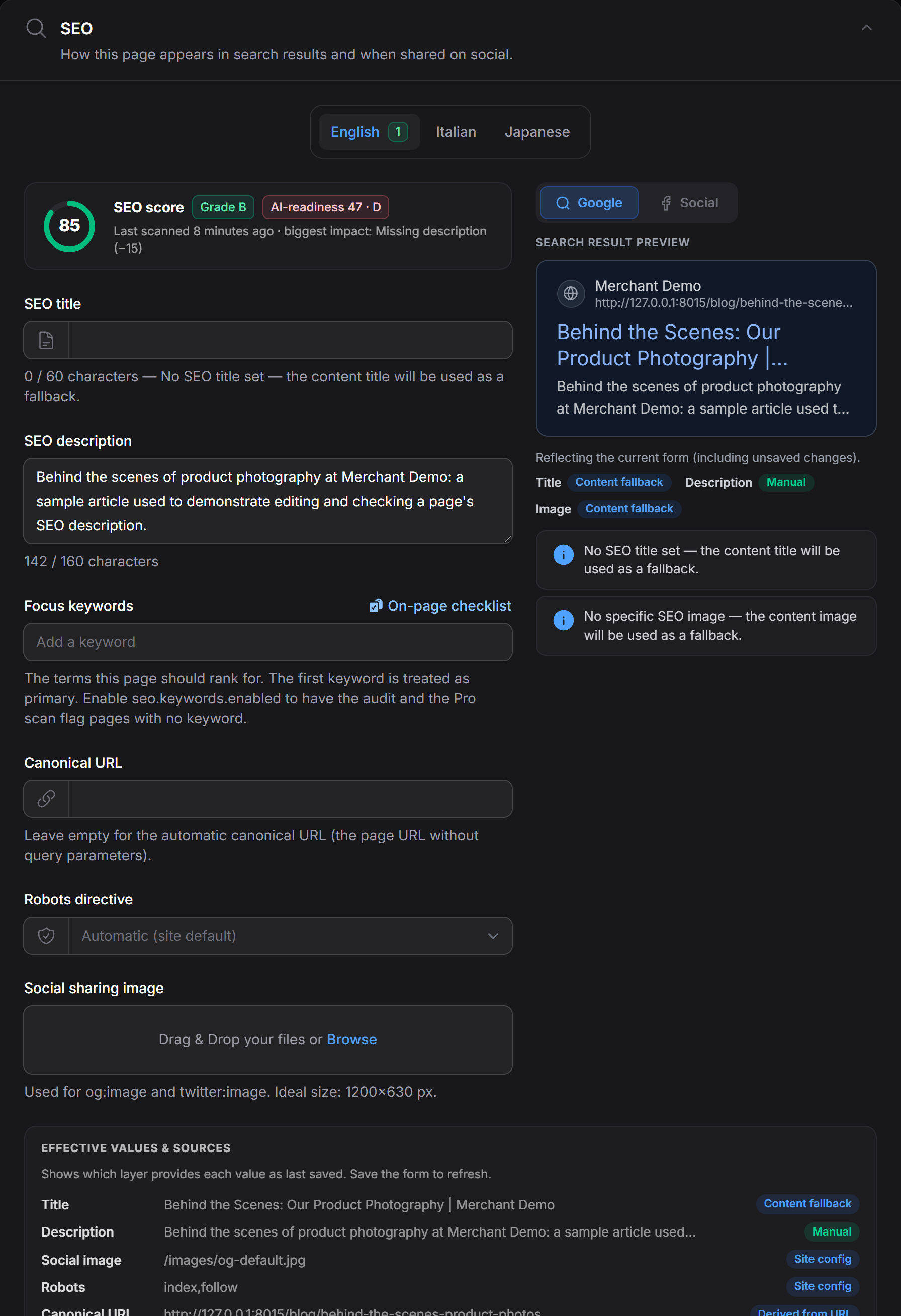
Example from the Merchant demo. The fields use your panel's theme; available controls and character budgets depend on your installed version and configuration.
The section includes:
- Title & description with live character counters — the budget comes from the core length policy for the script being typed (60/160 for Latin text, ~30/80 for CJK, counted in graphemes).
- Focus keywords — a tags input. You type plain keywords; they persist in the core's structured
[{keyword, is_primary}]shape (the first is primary), sogetPrimaryKeyword()andSEODataread them unchanged. Enableseo.keywords.enabledto have theseo:auditcommand and the Pro scan flag pages that still lack a keyword (off by default — one gate, see Configuration). - Canonical URL (empty = automatic, query string stripped).
- Robots select (empty = site default).
- Social sharing image upload (og:image / twitter:image), stored on Filament's default disk under
seo/. - Search-snippet preview that mirrors the resolver's fallback chain live while you type.
- Source indicators — for each field, which resolver layer produced the effective value: Manual, Content fallback, Model-type default, Global default, Site config, or Derived from URL.
Limiting fields
static::seoSection(['title', 'description'])Accepts any subset of title, description, focus_keywords, canonical, robots, og_image.
Without the trait, SEOFields::make(?array $only) returns the same section directly.
How values persist
The section binds to a seo_meta state group and saves through the core seoMeta() relationship (update-or-create) — no columns on your own tables, and the values immediately become layer 6 (explicit) in the resolver.
Several languages
The core keeps one seo_meta row per (model, locale). Pass the locales a page is published in and the section renders one tab per language (Filament 1.9):
static::seoSection(locales: ['en', 'it', 'ja']);
// or, without the trait
SEOFields::make(locales: ['en', 'it', 'ja']);
Or once for every resource, in the package config:
php artisan vendor:publish --tag=seo-filament-config// config/seo-filament.php
'locales' => ['en', 'it', 'ja'],Each tab edits its own row and carries its own:
- counters — the length policy for that language's script, so an empty Japanese title reads
0 / 30while the English tab reads0 / 60on the same page; - preview (SERP / social card) rendered from that locale's resolved values;
- fallback indicators describing that locale's row;
- a badge with the number of fields set in that version, so the empty translations stand out.
The tab is labelled with the language's name in the panel's language (Italiano / Italian) when ext-intl is loaded, and with the code otherwise. All tabs are validated and saved together; a language nothing was entered for never gets a placeholder row.
Custom form-state bindings
With several locales the state path is seo_meta.{locale}.title; with one it remains seo_meta.title. Use the matching path in custom form actions.
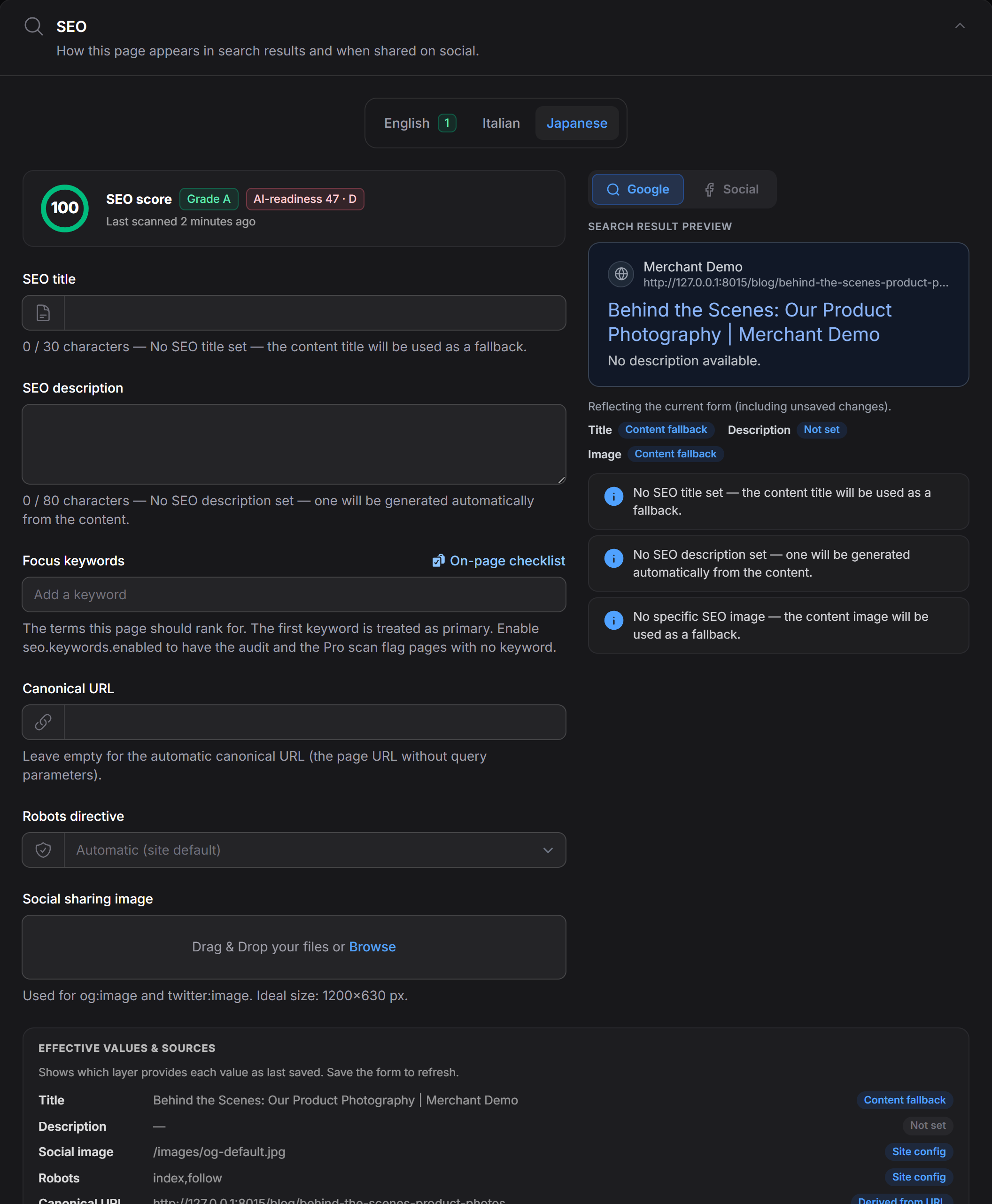
Merchant demo, September 9, 2026, with locales: ['en', 'it', 'ja']. The empty Japanese tab uses its own counters. The English title here comes from the demo model's content fallback: adding a language tab does not translate your content. The Pro score above the fields is the record's last scan result, not a separate score for each language tab.
With a translatable plugin
With lara-zeus/spatie-translatable 1.x on Filament 4 or 2.x on Filament 5, use Rankbeam's page adapters for Edit and Create. Replace only the page trait imports; keep the plugin's resource/list traits, panel plugin and LocaleSwitcher action:
// In your EditPost page:
use Rankbeam\Seo\Filament\Resources\Pages\EditRecord\Concerns\Translatable;

// In your CreatePost page (a separate file):
use Rankbeam\Seo\Filament\Resources\Pages\CreateRecord\Concerns\Translatable;
Each page still declares use Translatable; inside its class. The plugin remains an optional application dependency. Use its latest patched version; the local integration fixture covers plugin 1.0.4 / Filament 4.13.1 and plugin 2.0.1 / Filament 5.8.1.
Switching keeps unsaved parent content, SEO metadata and structured-data drafts in the editor. Save validates every visited language and saves them together in a database transaction. A validation error opens the language that needs attention. Uploads are stored on Save; leaving or reloading the page discards unsaved drafts. Saving a draft does not translate missing content for you.
The adapters preserve the normal before/after hooks and form-data mutators. If your page overrides handleRecordCreation(), handleRecordUpdate(), callHook() or transaction methods, integrate the adapter behavior in that customization and test its save flow. Database transactions do not roll back filesystem writes; applications should retain their usual orphan-file cleanup.
For custom live text fields on Livewire 3, prefer ->live() or ->live(onBlur: true) over an explicit debounce: the latter delays local model state and can lose the last keystrokes during a quick locale switch. Rankbeam's title and description fields use the default request debounce.
The upstream page traits alone refill forms during a switch. Rankbeam guards against their accidental metadata writes, but those traits do not preserve SEO drafts; migrate Edit/Create pages to the adapters. Explicit locales: tabs remain a shared editor and take precedence over the page switcher.
With no explicit locale list or page locale, the section edits the app locale.
Structured data (schema.org)
An optional Structured data section lets editors attach JSON-LD rich-result schema without touching code. Add it alongside the SEO section:
public static function form(Schema $schema): Schema
{
    return $schema->components([
        // ... your fields ...
        static::seoSection(),
        static::seoSchemaSection(),     // optional
    ]);
}
(or SEOSchemaFields::make() directly, without the trait).
It writes into the core seo_meta.schema_jsonld column — the same value the schema renderer emits — and is pure UI binding: every document is produced by a core schema builder and validated by the core SchemaValidator before it can be saved. It adds no schema logic of its own.
The section offers:
- Automatic breadcrumb — a single toggle, led with as the zero-config win. Derives a
BreadcrumbListfrom the record's parent chain viaBreadcrumbSchema::fromModelAncestors(). Nothing to fill in — it follows the model's ancestors. - Schema blocks — a repeater. Each block is either an FAQ (question / answer pairs →
FAQPage) or a Product (name, description, image, brand, SKU, price + currency, availability →Product), built by the coreFAQSchema/ProductSchemabuilders.
Validation
A block that would build malformed JSON-LD is rejected on save with the core validator's message — e.g. an FAQ entry with no answer, or a Product with no image or offer (this builder requires these fields; this is not a complete statement of Google’s requirements for every Product search feature). Blocks left empty are simply ignored.
What it stores
schema_jsonld holds the built document(s): a single object when there is one, a JSON array when there are several (breadcrumb first, then your blocks). Both are valid JSON-LD and render unchanged through @seo / renderSchema().
Schema it doesn't manage
Schema you authored in code that this editor cannot represent — a hand-authored @graph, an exotic @type, or a Product carrying fields the form doesn't expose (reviews, ratings, GTIN/MPN) — is preserved verbatim. Opening and saving the form never clobbers it.
Troubleshooting
- The saved field is missing from the page: confirm that your template renders
@seo($model)for the same record and locale. - A field still uses a fallback: check whether the field has a saved override in the active language. The source indicators identify the resolved layer.
- A language tab is missing: check the explicit
locales:argument, package config and any page-level translation switcher. Their precedence is described above.
Testing a custom panel in Testbench
If you boot Filament inside orchestra/testbench, register Filament's SupportServiceProvider before LivewireServiceProvider — Filament rebinds Livewire's DataStore, and the wrong order fails every Livewire test with ViewErrorBag::put(): ... null given. Real apps are unaffected (package discovery orders providers correctly).